
How do I reset my National Casino password?
Use the restore-password link under the login form, open the email National Casino sends to your account address and set a new password. Your balance, bonuses and documents stay exactly where they were.
Password Help
1 link sent to your email
24/7 Live chat help
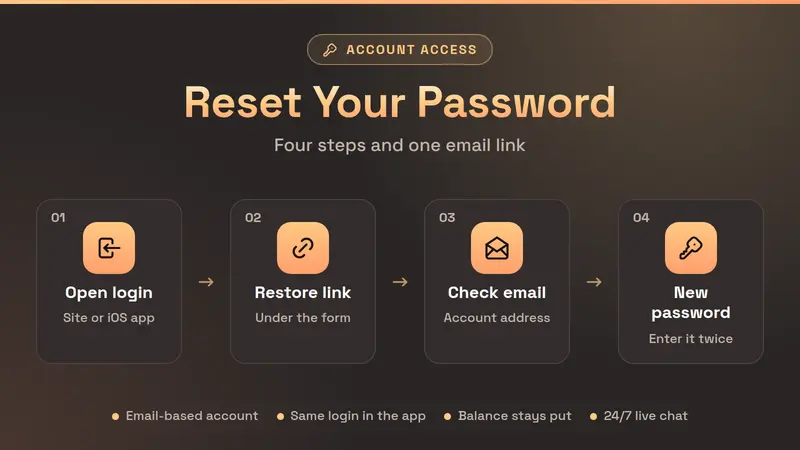
Reset Your Password in Four Steps
To reset your National Casino password, open the login window, follow the restore-password link under the form and enter the email address you signed up with. National Casino sends a reset link to that inbox. Open it, type a new password twice and save. You can log in again straight away, on the website or in the app.
That is the whole process, and it rarely takes longer than a cup of tea. The steps below spell it out for New Zealand players, including the small details that trip people up - like which email address counts and why an older link suddenly stops working.
Open the login window
Tap Log In on nationalcasino.com or in the iOS app. Do not type the password again if you are unsure of it.
Follow the restore link
Under the login form there is a link to restore your password. Tap it and a short form opens.
Enter your account email
Use the address you registered with. National Casino signs players up by email, not by phone number.
Set the new password
Open the email, follow the link, enter the new password twice and save. Then log in as usual.
Seen the message "You have entered wrong credentials several times. Please restore your password using the link below"? That is National Casino's own prompt after a run of failed attempts. It simply points you to the same restore link - follow it rather than guessing again.
What to Do Right After the Reset
A new password is also a good moment for a quick tidy-up. None of this is required, but each item takes seconds and saves a headache later, especially if you play on more than one device.
- Update your password manager so it stops filling in the old one.
- Sign in on your phone - the app and the site share one account and one password.
- Delete the reset email once you are back in, so the link is not lying around.
- Check your balance and bonus - both should look exactly as before.
- Finish verification if you have not yet, so your first withdrawal is not held up.
- Set deposit limits in the account while you are in the settings anyway.
If you share a computer with others in the house, log out when you finish a session and do not let the browser remember the password. It is an old tip, but it is still the one that prevents most account mix-ups.
How the National Casino Reset Works
National Casino runs its accounts on email. When you register, the form asks for an email address and a password; a phone number is not part of sign-up. That is why the reset always goes through your inbox - there is no SMS code step to wait for.
When you request a reset, the casino emails a one-time link to the address on your account. The link opens a page where you choose the new password. If you ask for a second link, the first one stops working, so always open the most recent email. A link that has sat unused for a long time may also expire; in that case just request another.
If the email does not arrive
Most "missing" reset emails are sitting in the spam or promotions folder. Search your inbox for "National Casino" before anything else. If there is still nothing after about ten minutes, check that you typed the same address you registered with - a spare Gmail or an old work address is the usual culprit. Still stuck? Open live chat. Support is available 24 hours a day, every day of the year, and can confirm which email is on the account once they have checked it is really you.
Choosing a password that lasts
Go for something long rather than clever: three or four unrelated words strung together are easier to remember and harder to guess than a short mix of symbols. Do not reuse the password from your email account. If someone ever got into your inbox, they could reset every account linked to it - the casino included.
Changing the password while logged in
If you know your password and simply want a new one, you do not need the email at all. Open your account settings, pick the password option, enter the current password and then the new one twice. The form checks the current password first and will tell you if it is wrong, which is a handy sign that the reset link is the better route.
Before and After a Reset
A common worry is that resetting the password somehow restarts the account. It does not. Only the key changes - everything behind the door stays put.
| Item | Before the reset | After the reset |
|---|---|---|
| Password | Old one | New one |
| Saved logins | Old password filled in | Update needed |
| NZD balance | Your balance | Unchanged |
| Active bonus | In progress | Unchanged |
| Pending withdrawal | In the queue | Unchanged |
| Documents | Uploaded | Unchanged |
| App access | Old password | New password |
Swipe the table
The only real to-do after a reset is teaching your devices the new password. Browsers and password managers keep offering the old one until you overwrite it, and that is behind most "the new password does not work" moments.
Password Questions From NZ Players
01How long does the National Casino reset email take?
Usually a minute or two. If nothing shows up after ten minutes, check the spam and promotions folders, then request one more link. Only the newest link works, so use the latest email.
02Why does National Casino say I entered wrong credentials?
The login form counts failed attempts. After several in a row it shows a message asking you to restore your password with the link below the form. That is a safety step, not a ban - a fresh password gets you straight back in.
03Can I reset my password in the National Casino app?
Yes. The iOS app "National Casino: Online Slots" uses the same account and the same restore link as the website, so a password set in one works in the other.
04Will a password reset cancel my bonus or pending withdrawal?
No. A reset only changes the way you sign in. Your NZD balance, active bonus, wagering progress, pending withdrawals and uploaded verification documents are untouched.
05I no longer use the email on my account. What now?
Open live chat, which runs 24/7, and explain that you cannot reach the old inbox. Support will confirm who you are before changing the email, so have your account details and ID handy.
06How do I change my password when I am already logged in?
Go to your account settings and choose the password option. You will be asked for the current password first - the form rejects a wrong one - and then for the new one twice.
Keep Reading
Back In and Ready to Play
Once the new password is set, your NZD balance, bonus and game history are waiting where you left them. Log in and pick up the next spin.