

Playing in NZD
How to play at National Casino in NZD: pick NZ$ in your account, deposit step by step, avoid common currency mistakes and check card fees.
Welcome Package
200% up to NZ$1,000
+ 100 Free Spins
Why NZD is the setting to get right
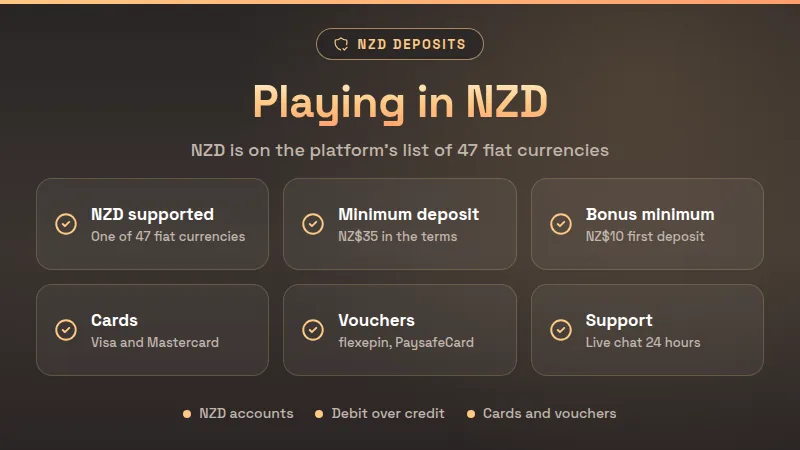
To play at National Casino in NZD, make sure your account shows NZ$, then deposit with a Visa, Mastercard, flexepin or PaysafeCard option from the NZ cashier. Check the amount in NZ$ before you confirm, and choose debit over credit, because a credit card deposit counts as a cash advance.
Playing in NZD means your balance, stakes, bonuses and withdrawals are all counted in New Zealand dollars. You see NZ$ on the cashier screen, on your game bets and in your transaction history, so there is no mental arithmetic every time you spin a reel or open a live table. The platform behind National Casino lists NZD among 47 fiat currencies, which is why a New Zealand account can run in the dollars you already spend.
The second reason to care is cost. When the currency on your card, in your account and in the cashier all match, there is nothing to convert and nothing for your bank to take a margin on. When they do not match, every deposit turns into a small currency exchange that you did not plan for, and the amount leaving your bank no longer matches the amount landing in your balance.
- 47 fiat currenciesCurrencies on the platform list
- IncludedNZD
- NZ$35 in the termsMinimum deposit figure
- NZ$10First deposit bonus minimum
- 24 hours, seven daysSupport hours
Treat the figures above as a starting point. Minimums are set on the platform side and can be updated, so the cashier screen always has the final number. Look at it before you type an amount, and if the symbol in front of it is not NZ$, stop and ask live chat before paying anything.
Common mistakes when depositing in NZD
Most problems with NZD play are small habits rather than big failures. They cost a few dollars here and a delayed deposit there, and they are all easy to avoid once you know where they hide. These are the ones that come up most often for New Zealand players.
- 01
Skipping the currency check
Before you pay, read the currency symbol on the cashier screen. A deposit made while another currency is showing is the usual source of surprise amounts on a bank statement.
- 02
Using a credit card
A credit card deposit counts as a cash advance, which can mean interest from the first day and a fee from your bank. A debit card avoids that treatment completely.
- 03
Ignoring foreign card fees
If your card is not an NZ-dollar card, your bank may add a foreign transaction fee to each deposit. Check your card terms before assuming NZ$50 leaves your account as exactly NZ$50.
- 04
Following old payment guides
Payment guides age quickly. Use only the methods your own cashier lists today, not what an older article or forum post says was available in New Zealand.
- 05
Mixing up bonus amounts
Offer banners are sometimes quoted in other currencies. Read the amount in NZ$ on the bonus page inside your account before you deposit with an offer in mind.
- 06
Splitting one deposit into many
Several small top-ups to reach a bonus minimum can add a fee each time. Work out the amount first, then deposit once and keep the receipt.
If you are depositing with a welcome offer in mind, read the welcome bonus page first and compare it with what the cashier shows. The numbers you are told to expect and the numbers on screen should match before you pay.
Step by step: your first NZD deposit
- 1Register with emailSign-up uses an email address and a password, and the phone number field is hidden. Choose New Zealand and pick NZD wherever a currency is offered.
- 2Confirm the currencyOpen your account and check that balances show NZ$. If you see anything else, ask live chat before you deposit a single dollar.
- 3Open the cashierGo to the deposit page and look at the methods listed for New Zealand. Visa, Mastercard, flexepin and PaysafeCard appear in the NZ cashier.
- 4Pick your methodChoose a debit card or a prepaid voucher if you want to avoid cash advance treatment. Have the card details or voucher code ready before you start.
- 5Enter the amount in NZ$Type the amount and compare it with the minimum shown on screen. The platform terms use NZ$35 as the minimum deposit figure.
- 6Check the bonus choiceIf the cashier asks which offer you want, choose it before paying. The first deposit bonus needs at least NZ$10 according to the platform settings.
- 7Confirm and keep proofApprove the payment, wait for the balance to update in NZ$ and screenshot the confirmation. Quote it to live chat if anything looks wrong.
A quick tip
Verify early. The terms ask for photo ID, proof of your payment method and proof of address less than three months old. Upload them in the Document verification tab, with images up to 5 MB, so a later withdrawal is not held up.
NZ specifics: methods, banks and help
The NZ version of the National Casino app shows four payment options in its cashier. Two are bank cards and two are prepaid vouchers, which suits players who prefer to cap their spending at the amount they load. The site also offers an English - NZ language setting, so labels follow local conventions.
| Method | Type | Tip |
|---|---|---|
| Visa | Card | Prefer debit |
| Mastercard | Card | Prefer debit |
| flexepin | Prepaid voucher | Check voucher value |
| PaysafeCard | Prepaid voucher | Check voucher value |
Swipe the table
These methods come from the NZ version of the brand's app, and lists can change, so the live cashier is always the final word. A voucher is normally bought in one currency, so make sure its value matches the NZ$ amount you want to deposit.
Run through five quick checks before each deposit: currency symbol, method, debit or credit, amount in NZ$ and bonus choice. It takes under a minute and saves most of the usual mistakes.
Help is available around the clock. The contact page promises support 24 hours a day, seven days a week, by live chat or email, and the contact form is answered within 24 hours. No phone line is published. If a deposit does not show up, live chat is the fastest route. Locked out? The password reset guide covers the steps.
Keeping your NZ$ budget under control
One advantage of playing in NZD is that your spending is easy to read. A NZ$2 stake is a NZ$2 stake, and the history in your account lines up with your bank statement. Use that clarity to keep a budget you can actually follow, instead of one that drifts with exchange rates.
- Set a weekly deposit amount in NZ$ before you open the cashier, and treat it as a ceiling, not a target.
- Keep gambling money separate from rent, bills and groceries; a dedicated debit card or voucher makes this easier.
- Do not chase losses with a bigger deposit. Step away and come back another day.
- Check your transaction history in NZ$ once a week and compare it with your plan.
- If play stops being fun, the Problem Gambling Foundation (pgf.nz) and the Gambling Helpline offer free, confidential support in New Zealand.
Myths and misunderstandings about NZD play
Any NZ card will work
A card issued in New Zealand does not guarantee a gambling deposit goes through, as some banks decline them. If one fails, try another method rather than retrying many times.
Credit cards are safer
A credit card can feel safer, but the deposit counts as a cash advance, so it tends to cost more. Debit or a voucher keeps spending to money you already have.
Conversion is always free
Even when the casino does not convert anything, your bank might. Whether it is free depends on your card, not on the site.
You need crypto for dollars
The platform's account currencies are fiat, and NZD is among them. You can stay in New Zealand dollars from your first deposit without touching crypto.
You must deposit to try a game
Slots can be opened in demo mode without logging in, so you can look at a game before depositing. Live tables do not have a demo.
If you want to see how live tables play before you commit any NZ$, the live casino page shows what is on offer. Remember that live games run on real stakes only, so set your limit first and keep to it.
NZD play: your questions answered
01Can I play at National Casino in NZD?
Yes. NZD is on the platform's list of 47 fiat currencies, so a New Zealand account can show balances, stakes and withdrawals in NZ$. After registering, open your account and check that the symbol reads NZ$ before you make a deposit. If it does not, ask live chat to help.
02What is the minimum deposit in NZD?
The platform terms use NZ$35 as the minimum deposit figure, and the first deposit bonus needs at least NZ$10. These can be updated, so read the amount on the cashier screen before paying. If the figure on screen differs from what you expected, contact support before you confirm.
03Which payment methods can I use in New Zealand?
The NZ cashier in the brand's app shows Visa, Mastercard, flexepin and PaysafeCard. Your own cashier is the final word, because lists can change. If a method is not shown there, it is not available to you, whatever an older guide says.
04Should I deposit with a credit card?
A debit card is the better choice. A credit card deposit counts as a cash advance, which can mean interest from day one and a bank fee. A prepaid voucher is another way to deposit only money you already have and to cap your spending.
05What documents do I need before withdrawing?
The terms ask for photo ID, proof of your payment method and proof of address less than three months old. Sometimes proof of funds or a selfie with ID is requested. Upload everything in the Document verification tab, images up to 5 MB, because withdrawals wait for verification.
06Who do I contact if my NZD deposit does not appear?
Use live chat, which is open 24 hours a day, seven days a week, or send an email through the contact page; the form is answered within 24 hours. Have your transaction confirmation and screenshot ready so the team can find the payment quickly.
07Can I try games before depositing NZ$?
Slots can be launched in demo mode without a login, which is a good way to learn a game before using real money. Live casino tables do not offer a demo, so those need a deposit. Set your NZ$ limit before you start playing for real.
Keep Reading
Your Next Spin Is One Tap Away
Join National Casino in a minute, claim the NZ$1,000 welcome package and open the lobby on your phone or desktop.